Email templates
Find notification types, sending events, and supported pulse email variables.
Datatrap sends these emails for you. Each one has built-in wording, which you can replace under Settings, then Email templates. This page lists them by section, as the screen does.
To reach Email templates you need the same access as managing users. See Roles and permissions.
Admin notifications
Sent to your clients' admins.
| When it is sent | |
|---|---|
| Wave expiry notification | When a wave is about to expire. |
| Response completion notification | When a participant completes a response. |
360 feedback
Sent to raters and participants during 360 feedback campaigns and pulse check-ins.
| When it is sent | |
|---|---|
| Invitation to nominate | Invites a participant to choose who gives them feedback, when nominations open. |
| Nominations to approve | Tells a manager that nominations are waiting for their approval. |
| Rater invitation | Asks someone to give feedback on a colleague, with their sign-in link. |
| Rating reminder | Sent to raters who have not finished yet, with a fresh sign-in link. |
| Thank you | Thanks a rater once they have finished their feedback. |
| New sign-in link | Sent when a rater or participant asks for a new link on the sign-in page. |
| Results ready | Tells a participant their 360 results are ready to view, with a sign-in link. |
| Development plan reminder | Sent to a participant when actions in their development plan are overdue. |
| Pulse invitation | Sent to each rater when a pulse opens, and straight away to anyone added while it is open. One email lists everyone they are asked about, with each person's focus areas and the close date. A rater added for another person gets a new invitation listing everyone. |
| Pulse reminder | Sent once to raters who still have someone to rate, when the close date is 3 days away or less and at least a day after their invitation. |
| Pulse thank you | Sent once to a rater when they have answered for everyone they were asked about. |
| Pulse results ready | Sent to each person rated in a pulse when their results are ready, after it closes. No one is emailed if nobody answered about them. |
How a pulse runs, and when each of these goes out, is covered in Run a pulse survey.
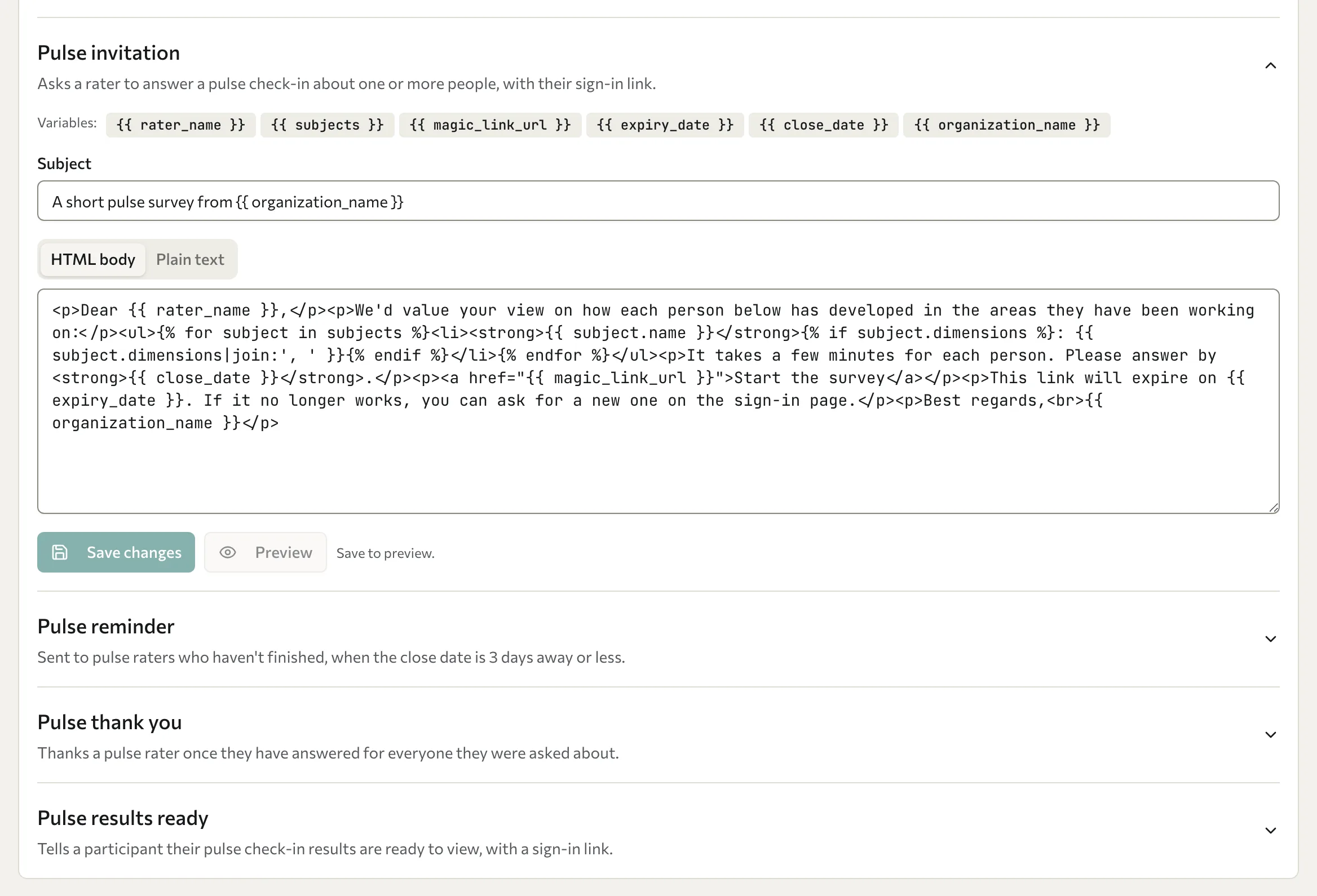
Pulse email variables
Every email lists its variables above the subject line. The pulse emails use these:
| Variable | In | What it contains |
|---|---|---|
rater_name | Invitation, reminder, thank you | The rater's name. |
subjects | Invitation, reminder | The people the rater is asked about (in the reminder, only those still to do). Each has a name and dimensions, that person's focus areas. |
magic_link_url | Invitation, reminder, results ready | The recipient's personal sign-in link. |
expiry_date | Invitation, reminder, results ready | When the sign-in link expires. |
close_date | Invitation, reminder | When the pulse closes, as a date and time in UTC, for example "2 October 2026, 21:59 UTC". |
recipient_name | Results ready | The name of the person rated. |
organization_name | All four | The client organisation's name. |
Because subjects is a list, show it with a loop, as the built-in wording does:
{% for subject in subjects %}{{ subject.name }}: {{ subject.dimensions|join:', ' }}{% endfor %}Edit the wording
Follow Edit email templates to save, preview, reset, or restore a template. Templates support variables, conditions, and loops. Tags that load or include other templates are refused when saving.