See your pulse results
Find your pulse results and understand scores, change markers, hidden groups, and comments.
A pulse check-in asks some of the people who gave you 360 feedback a few of the same questions again, about the areas you have been working on (your focus areas). Your results show how their view has changed since the 360.
Open your results
When a pulse check-in about you closes and at least one person has answered, you receive an email saying your results are ready.
Open the link in the email
Select the link in your results email. It signs you in to your My360 area; no password is needed.
Select View results
On your dashboard, the Pulse check-in results card says your results are ready. Select View results. You can also select Results in the menu; your pulse results appear at the top of the page, above your 360 report, newest first.

Read your results
Each pulse check-in has its own card with its name and the date it closed. For each focus area, you see one row per rater group, such as your manager, your peers or your direct reports.
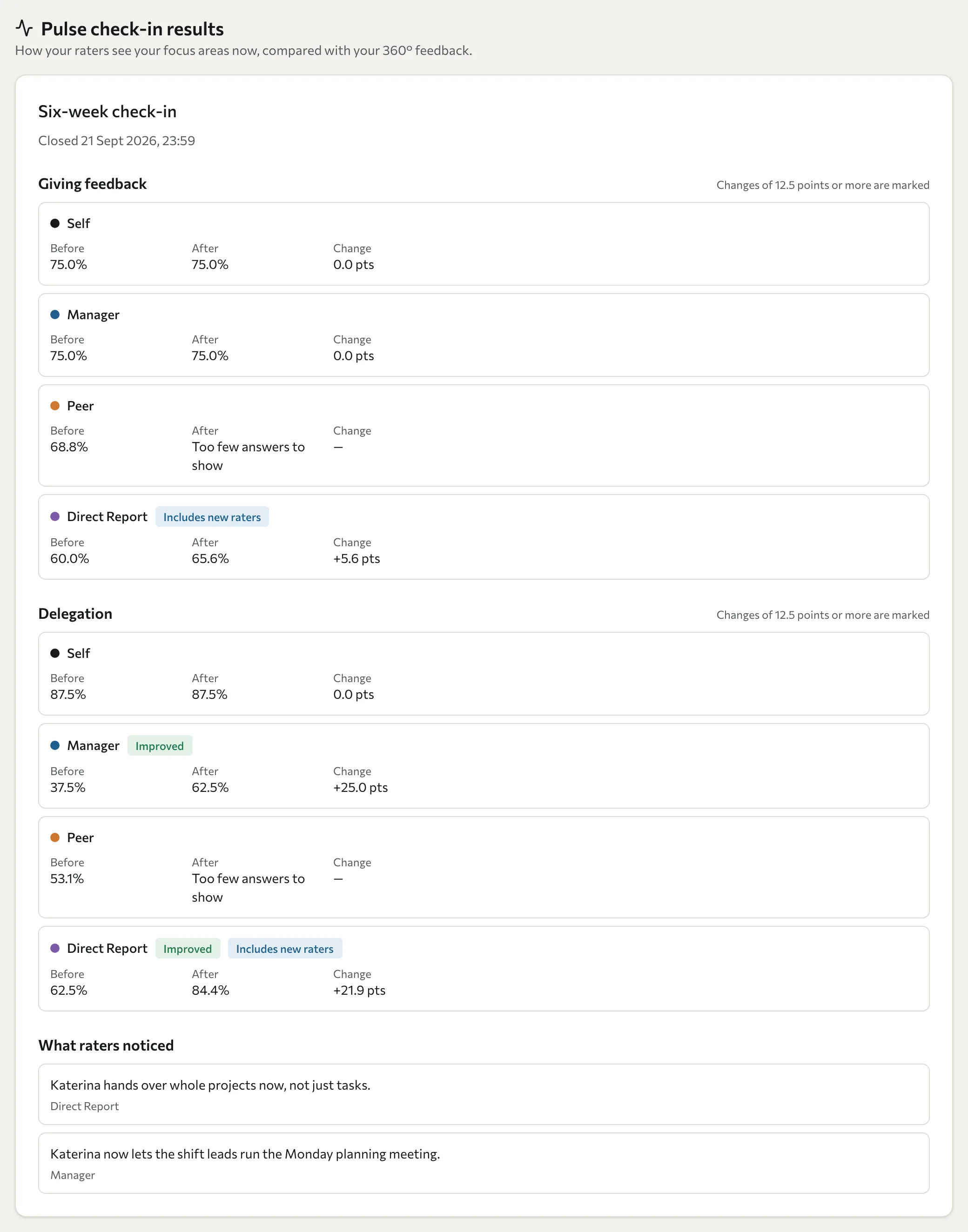
| You see | Meaning |
|---|---|
| Before | The group's score for this focus area in your 360. |
| After | The group's score in this pulse check-in. |
| Change | The difference, in percentage points ("pts"). |
| Improved or Declined | The change meets the marking threshold. The line above each focus area says how large, for example "Changes of 12.5 points or more are marked". Smaller changes are shown but not marked. This threshold is not a statistical significance test. |
| Too few answers to show | Too few people in an anonymous group answered, so their scores stay hidden to protect them. |
| No earlier rating | That group did not rate you on this focus area in your 360, so there is nothing to compare with. |
| Includes new raters | Someone in that group did not rate you in your 360, so the comparison for that group is less exact. |
| Change not marked: this area's questions point in different directions | Some of this focus area's questions count positively and some negatively, so a change is shown but never marked. |
Scores are percentages, like your 360 report. If you were asked to rate yourself again, your own rating appears as Self.
A pulse check-in is a snapshot, not a verdict. A small change, or no change, is common after a few months. Use your results to decide what to keep working on, and talk them through with your coach or manager.
Comments
Under What raters noticed, you see the comments people wrote about the change they have noticed. Each shows only the rater group, never the person's name. Your training partner reviews comments before you see them, so some may not appear.
Your comparison figures are saved when the pulse closes. Later comment moderation can change which comments you see.
Troubleshooting
My link says "Link invalid". Each link works once and expires after 72 hours. On the sign-in page, enter your email and select Request new link. A new link is sent to you.
I do not see the Pulse check-in results card. Your results are not ready yet, or nobody answered the pulse about you, in which case there are no results and no email. A results email does not guarantee visible scores for every group; anonymity thresholds still apply. You may also have opened a link for a different programme; use the link from your results email.