Export response data
Download a wave as CSV or Excel and understand the limits of export anonymisation.
Export a wave when you need its data for further analysis. You need the Facilitator or Admin role: a Viewer cannot export. What the file contains also depends on the client organisation's access setting (see What the access level changes).
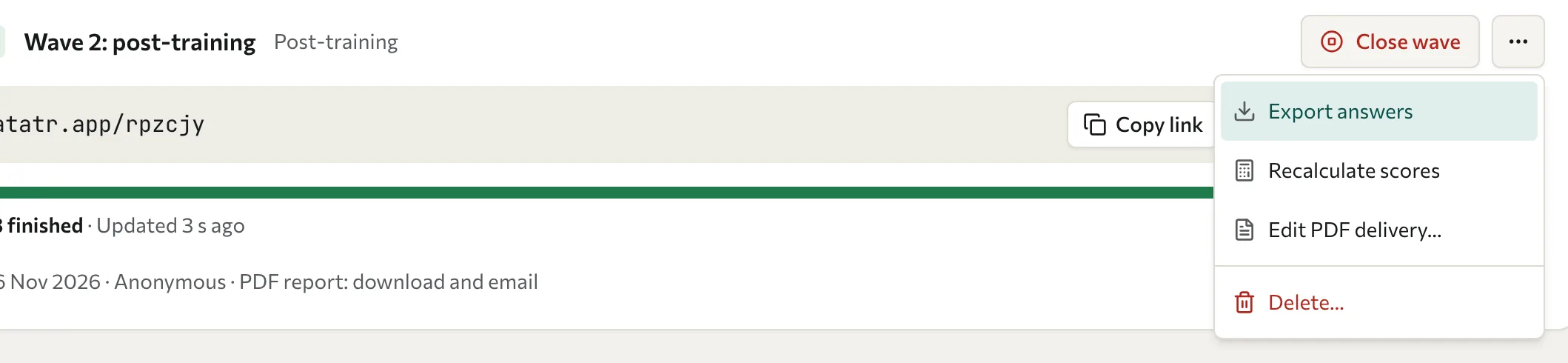
Download a file
- Open the assessment's Waves tab.
- On the wave's card, select More (the three dots button), then Export answers. The export page opens.
- Choose Excel (.xlsx) or CSV (.csv).
- Optional: set dates under Date range (optional). The form leaves this out when the export is always anonymised.
- Select Question responses to include answer columns.
- To remove names and email addresses, turn on Anonymize participant data. The form leaves this out when the export is always anonymised.
- Select Generate export and wait for the download.
The file downloads straight away. The export history on the page lists only the exports made since you opened it, and it is cleared when you leave, so keep your own copy of each file. The API also offers exports that run in the background.
What the options control
The file follows the format, date range, Question responses, and Anonymize participant data options. The Dimension scores and Archetype assignments options don't change the file, so check the columns in the downloaded file.
An anonymised file gives each person an anonymous ID. The ID is different in every export, so rows can't be matched to the same person in another file.
What the access level changes
Each client organisation chooses in its Portal how much of its data you can see. The setting of the organisation that owns the wave's cohort applies to the export.
| Organisation's access level | Export |
|---|---|
| Full access | Every option is available. |
| Aggregated only | Always anonymised, with limits (see the following list). A 360 round can't be exported. |
| No access | No export. |
When an export is always anonymised, the form shows "This export is always anonymised to protect the people who answered, so it cannot be filtered by date." in place of the date range and privacy options.
Under Aggregated only, every export of the organisation's waves:
- replaces names and email addresses with an anonymous ID, and leaves out the response ID and the time of each answer
- leaves out the answers to any question that fewer than 3 people answered
- isn't created at all when fewer than 3 people answered the wave. Datatrap shows an error instead.
A 360 round's export needs Full access. It is always anonymised and can't be filtered by date.
Review the file before sharing
Anonymisation removes or replaces direct identity fields; it is not a guarantee that the file cannot identify anyone. Written answers, unusual combinations of responses, and small groups can reveal identity. Review the actual file and remove unnecessary detail before sharing it.
Exporting does not change the source responses or the wave's anonymous setting. See Data access and privacy for the organisation-level control.
PDF reports are produced separately. See Reports.